How to Add Google Play to the 9″ Pandigital Novel

Update: The link to the firmware no longer works, sorry, and I have not found a replacement.
I’ve just learned of an update for one of the better budget tablets that came out last year.
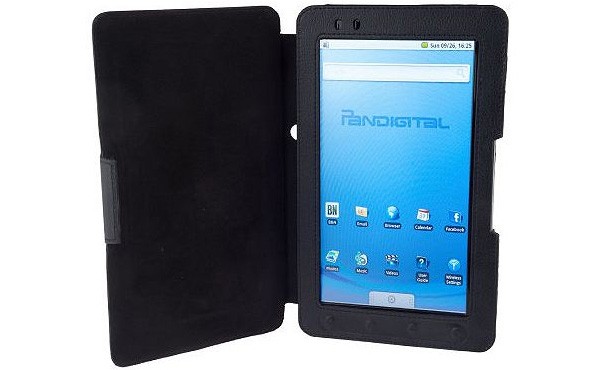
Pandigital is one of the more successful budget tablet makers, and they’ve been releasing tablets since July 2010. Late last fall they released the 9″ Novel, and at the time it was one of the better budget Android tablets. It’s getting a little long in the tooth now, given that it has a single core CPU, resistive touchscreen, and runs Android v2.0.
But I’m still seeing readers show up and ask questions about this tablet. Given that in the past week someone came looking for a way to update this tablet, I thought it worth a post.
Now, Pandigital never released any firmware updates for this device, but someone else did. It’s a hacked update, and it actually came out in March. I only found it today. I just finished with the update, and I’ve confirmed that the Android market does work, and so does the Kindle app and the Amazon Appstore. The process went without a hitch, and I think it’s safe for the average user.
This firmware is based on the one that originally shipped with the 9″ Novel. It was copied off of one and then modified. It comes with a number of apps, including:
- Android Market
- Kobo
- B&N
- Kindle
- Android Appstore
- File Manager
- Spare Parts
- Task manager
It’s still running an old version of Android, and you can get most of the apps online. But I would still get this update just because it adds the official Marketplace.
How To
The process is pretty simple. You’ll need an SD card and you should charge your tablet first.
- Download this ZIP file.
- Copy the DAT inside that ZIP file to the SD card in your 9″ Novel.
- Turn off your Novel.
- Start the update cycle by pressing the up volume button and the power button at the same time.
I found the update via SlateDroid. The developer had a 9″ Novel back in March and April, but he returned. He’s not supporting it anymore, but there are a number of tablet owners over at SlateDroid who probably already have this update installed.

Comments
Ellen Hage December 30, 2011 um 3:50 pm
I think I’ll dig mine out, blow off the dust and give this a try. Thanks, Nate.
Scott Washburn January 4, 2012 um 2:19 pm
That’s awesome! I tried it too and it works! What a great performer for the money!
Celine January 6, 2012 um 4:25 pm
were you able to get the android market and kobo? .. all i have witht he update is samslide and b&N
Scott Washburn January 31, 2012 um 9:10 am
Yes, it’s all there.
heather January 5, 2012 um 12:46 pm
I tried doing this and now my tablet wont turn back on….what should I do next?
Nate Hoffelder January 5, 2012 um 1:09 pm
I’d head over to SlateDroid and ask for help there. Sorry, but that’s more tech support than I know how to provide.
Tony September 8, 2012 um 1:31 am
Hold the power button and the up volume key for several minutes. It should come back on.
Celine January 6, 2012 um 12:41 pm
I have done the update but it looks exactly the same as before .. i still have sam slide, b&N, etc.. but no android market … help??.. please:)
Arlis January 11, 2012 um 3:43 pm
very cool. I just down loaded and it works great. Thank you.
john January 12, 2012 um 2:07 pm
i got it on here ..android market isnt coming up with no results on anything i type in android market anyone know how to get it going?
..
Jeff February 17, 2012 um 9:38 am
Wondered why this works for some and not others. Are they not doing the reset right?
Mine works and I loaded KOBO from freewarelovers.com maybe I should leave it alone. With this update will it play videos mine will not the way it is. Any help appreciated.
Also is there a way to download kobo books so they stay there and do not have to refresh through wifi everytime? New at this ereader stuff thanks
Dan Eddy February 21, 2012 um 11:52 am
I downloaded this file and I see it in ES Explorer. But I dont know how to copy to the SD card. How do I know if is is already copied to the card? I think not cause I booted up with the volumn up and power at the same time but nothing has changed. Thanks if you can help
Eric March 11, 2012 um 12:05 pm
SIMPLY AMAZING HOW MUCH OF A DIFFERENCE THAT DOWNLOAD MADE. ANDROID MARKET AND ALL. DONT KNOW WHO YOU ARE BUT THANKS FOR THE BLESSING. NOW MY WIFE IS HAPPY AGAIN.
zach March 25, 2012 um 2:41 pm
wont turn on 🙁
cburna April 6, 2012 um 8:39 am
Thanks works great. I’ve been checking Pandigital’s website every week for the last few months for a firmware update with no success. Thankfully we have geniuses out there!
James April 11, 2012 um 4:39 pm
Thanks Nate. It breathed new life in my tablet.
jay July 2, 2012 um 5:00 pm
So I’m new to this and need sum serious help..I have a pandigital novel 9″ black R90L200 I just got yesterday and I wanna know how do I get it to have the Android market and play videos..basically I want it to run like a andriod suppose to run so can somebody please help me..
Ibin July 23, 2012 um 9:43 pm
when i press the Volume & power button and hold it , nothing happens… Any hints or Help me.. lol
Chuck July 28, 2012 um 2:28 am
I followed instructions and it works great make sure you put the zip file on the card and not in any files on card the press and hold the volume up button the one on the left side and the power on hold both for about five seconds you will see the green light turn on the screen will say some stuff and take a few minutes i hope this helped.
Also Thanks Nate your the man..
kjlintner July 30, 2012 um 3:11 pm
Copy the .dat file to the root of your SD card, not the zip file. Make sure you are using the correct volume button, (the one pointing at the power button) and it should work, I just flashed mine and it works great. 🙂
nninja August 4, 2012 um 12:47 am
Thanks the procedure works great. I just updated my PND 9″ Novel with DAT file and now I have all the software. Thanks
John Ho August 24, 2012 um 10:23 am
The dat file has to be the only file on the SD card.
Alysha Potts August 27, 2012 um 9:46 am
I want to know if this is the only way that I can download apps to my Pandigital Tablet
Joe M. September 10, 2012 um 8:53 pm
I tried this update and both B&N and the Kobo app are having issues. Kobo gives me troubles with a file called com.android.library and B&N with com.adroid.homeui
Do not use the above update, it doesn’t work and will only give you headaches and anxieties.
Leave the unit the way it came!
S. Crews September 15, 2012 um 1:33 am
Did you try getting any help at http://www.slatedroid.com/topic/15773-alternate-bpdn-9-inch-firmware-opdn9/
Maybe the people there can help you out like they’ve done for so many others? Good luck!
Parker September 21, 2012 um 2:20 pm
I was just wondering if there was a specific SD card size that should be used?
lovuss November 20, 2012 um 9:17 am
e y si sirve todo me funciono chido
pero quisiera saber como fashearlo
x q haci agarra imagenes flash y todo chido mas rapido o
hacer el root para esta tablet
Ron November 28, 2012 um 8:46 am
Just did the update, It is amazing, my son will be excited.
Thanks for the info
Barb December 30, 2012 um 3:13 pm
I finally got the DAT file copied to the SD card. I did the power button/up volume thing. Nothing has changed. What now? Please help.
Genevieve January 4, 2013 um 12:49 am
very rookie here how do you save DAT on SD card I am sorry but I am not sure how to do that 🙁
Genevieve January 5, 2013 um 9:24 pm
Please Please someone help me!! I was able to do the update!! hurray me but now after being able to go a couple time on the market it is giving me a "A server error has occurred. Retry or cancel and return to the previous screen." what is happening? I tried a reboot but it didn’t help not sure what to do next…
Nate Hoffelder January 5, 2013 um 9:40 pm
Try creating a new gmail account. Log into that account from the tablet.
Pascal January 30, 2013 um 10:17 pm
You need to go uninstall the updates for the android market.
Once you are done, open the market again and install any free application.
This should fix your issue.
Rebecca February 13, 2013 um 12:05 pm
is there anyway to hook tablet up to my compter and update that way…i just got one second hand yesterday but my SD slot on my computer does not work….?
Vivianne March 14, 2013 um 12:34 am
I did this and It worked, how do u get my library back though?
Nate Hoffelder March 14, 2013 um 7:30 am
You need to download it again.
nick March 19, 2013 um 8:26 pm
i am looking through the whole file and cant see anything that says DAT file, which is the one that needs to be on the sd card, i do see disc image file..?
Nate Hoffelder March 19, 2013 um 9:30 pm
I’m not sure why you are seeing something different, but there’s just the one file in the ZIP folder. That is the file you need to copy over to your tablet.
jogk May 22, 2013 um 9:31 pm
Perform the procedure to reset the tablet but did not return to light, I mean that no signs of life, I’m desperate that I can do?
teensey June 11, 2013 um 1:42 am
i bought a 7″ pandigital tablet ereader 2011 for my grand-daughter so she can play games, down load kind, watch movies etc.. i cant get ANY thing to download, have a heck of a time touching to screen and swiping it to go up and down. i have a tramatic brain injury so directions need to real simply. also i know nothing of this devise. please help
Tonya August 5, 2013 um 7:38 am
I bought the 9inch tablet off someone used and went to do this update but the mediafire link isn’t working? Could you please send me an update for this that works. I would love to have the option of having the market.. Im running android 2.1 also.. do you know if there is any way to update to at least 2.2?? Thanks 😉
Nate Hoffelder August 5, 2013 um 9:25 am
The Mediafire link belonged to whoever originally posted that firmware. I checked and I don’t have a copy, sorry.
kim August 5, 2013 um 5:48 pm
get message that i can’t log in … file is private… how do I get it
Nate Hoffelder August 6, 2013 um 7:17 am
I don’t know.
Tonya August 6, 2013 um 8:59 am
Well then I guess this whole post is pointless if it doesn’t work..??
Nate Hoffelder August 6, 2013 um 9:11 am
Now, maybe. This post was written in December 2011 at a time when that ZIP file was still available.
Tonya August 6, 2013 um 9:17 am
I am having no luck at all updating this thing.. what a peice of crap..lol.. I just want at least Android 2.2 on it but Im guessing its basically garbage.. Thanks tho
Roberto October 27, 2014 um 1:10 am
Your the best bro!!! OMG I’ve had this tablet like 4 years now and I had no idea what to do with it because it was so slow and crazy confusing! I just did the update and I have all the new apps and all. I was gonna sell it in garage sale but I decided to check for an update one last time….I haven’t used this thing in years and now thanks to you I can! thanks!:)
Jav March 24, 2015 um 1:33 am
I bought this 9″ PanDigital Novel (w/ leather cover) and no charger at a swapmeet for $7. It wasn’t booting up at all, after charging it up and installing the new firmware update, it is up and running with no issues at all.
Nate Hoffelder March 24, 2015 um 9:37 am
Cool! I’m glad this helped.